
Change the admin language
Use the Oxify admin in English, Danish, German, Spanish, French, Italian, Japanese or Portuguese.
The whole Oxify admin (menus, editors, settings and help texts) is available in 8 languages. Changing it only affects what you see in the app. It doesn't change any text your shoppers see.
Where to find it: the language button at the top right of Oxify Cart Drawer → Home, or Oxify Cart Drawer → Settings → Preferred language. Both do the same thing.
Languages
English, Dansk (Danish), Deutsch (German), Español (Spanish), Français (French), Italiano (Italian), 日本語 (Japanese) and Português (Portuguese). Each language is listed in its own name.
Change it from Home
On Home, click the language button next to the page title. It shows the current language, for example English.
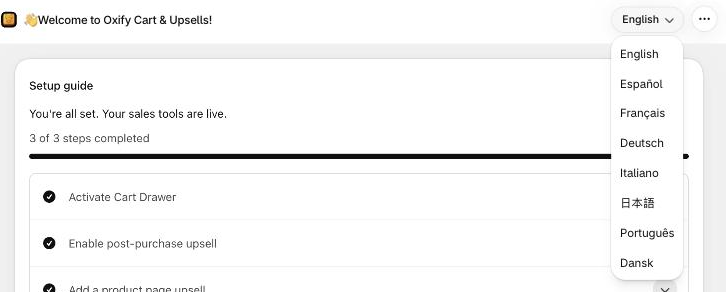
Pick a language. The app reloads in that language straight away.
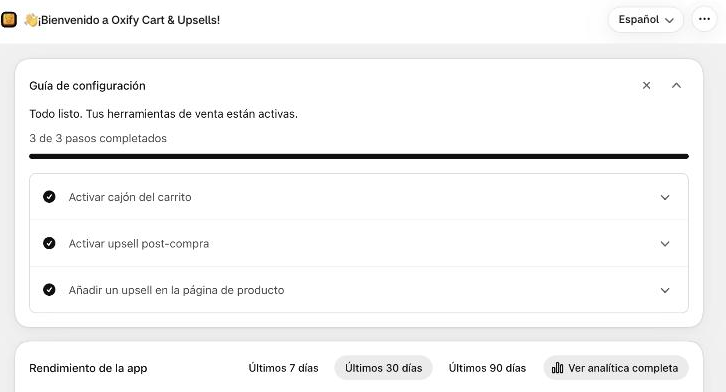
To switch back, open the same button (it now shows the new language, for example Español) and pick English.
Change it from Settings
Open Settings and choose a language in Preferred language. The page reloads in that language. There is nothing to save.
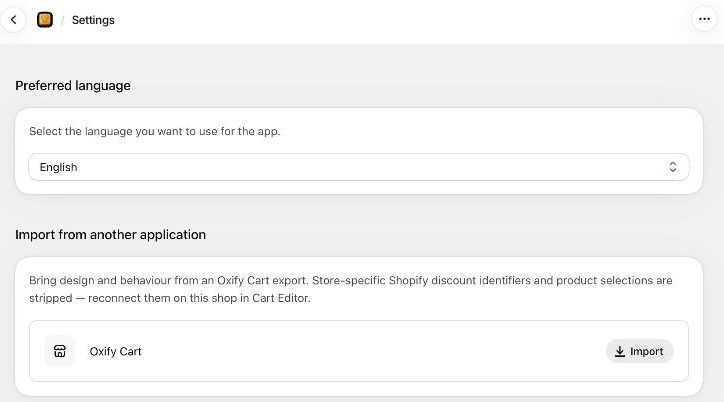
Good to know
- Default language. Until you pick one, the app follows your own Shopify admin language when it is one of the 8 above, and English otherwise.
- Per browser, not per store. Your pick is kept in the browser you use and wins over the Shopify admin language. Other staff keep their own language, and on another computer or browser you pick again.
- Shopper-facing texts are separate. The cart drawer, offers and checkout blocks use the texts and translations you set in each editor, and they follow the storefront language.
- Your own content stays as you typed it. Names you gave to offers, funnels and campaigns aren't translated.