
🛍️ How to Set Up Market-Specific Manual Upselling
Learn how to set up market-specific manual upsells in your cart editor to show personalized product recommendations for each region and boost your store’s AOV.
With Market-Specific Manual Upsells, you can configure different upsell products based on the customer’s market — giving every region a more localized and relevant shopping experience.
Step 1: Go to the Cart Editor
- In your Shopify admin, open the Oxify app and go to Home.
- On the Cart Drawer card, click Manage Cart Drawer (the button reads Set up Cart Drawer until the drawer is live). The Cart Editor opens.
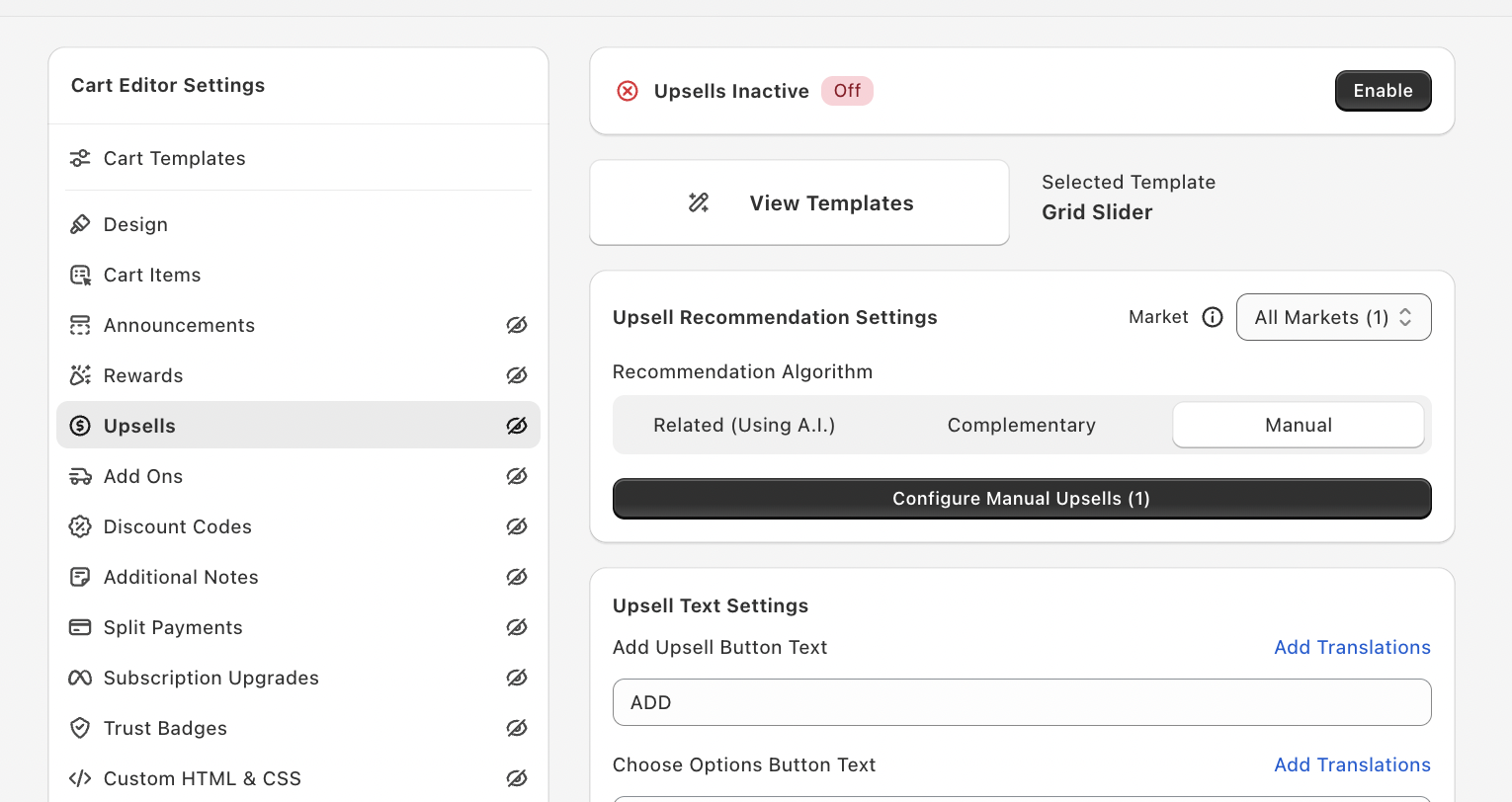
- In the Cart Editor Settings menu, select Upsells.
You’ll now see all upsell settings — templates, recommendation settings, text settings, and display settings.
Step 2: Enable Upsells
If the card at the top reads Upsells Inactive:
- Click the Enable button on the card to turn upsells on.
- Once enabled, you’ll be able to manage and preview your upsell recommendations.
Step 3: Choose the Recommendation Type
Under Upsell Recommendation Settings, Recommendation Algorithm offers three options:
- Related (Using A.I.) – Related upsells are based on the products in the cart.
- Complementary – Also based on the products in the cart, using the Shopify Discovery app. The editor notes that complementary upsells must be configured first.
- Manual – Lets you manually define upsell rules (trigger → upsell pair).
👉 Select Manual to set up your own upsell pairs.
Step 4: Select the Market
- Once Manual is selected, the Market dropdown appears on the right side of the Upsell Recommendation Settings box. Open it.
- Choose the market where you want to configure upsells — for example, United States, Germany, or India.
The list shows All Markets (your default pairs) and each market, with the number of pairs configured for it. Each market can have its own custom manual upsells.
Step 5: Configure Manual Upsells
- Click Configure Manual Upsells. The button also shows how many pairs the selected market has.
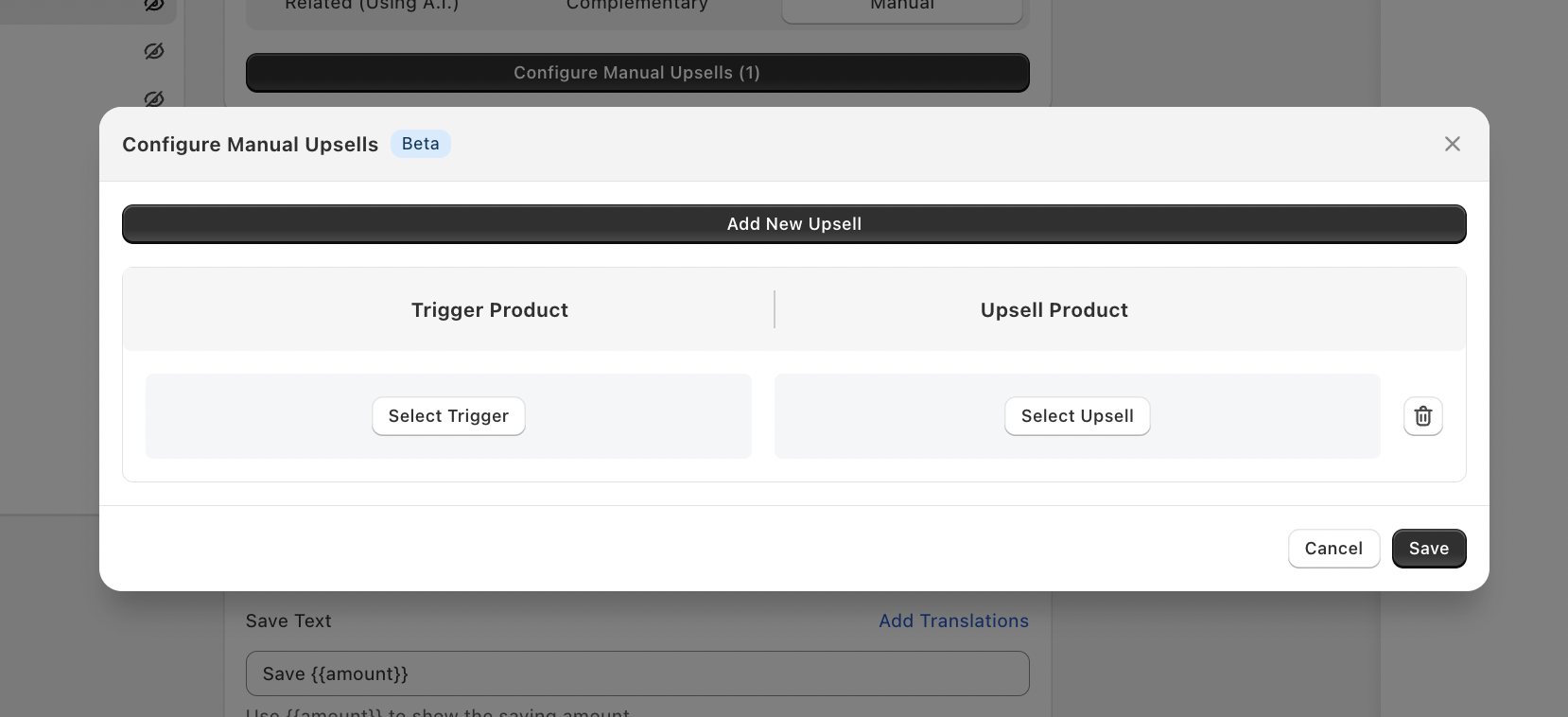
- A popup titled Configure Manual Upsells with a Beta badge will appear.
- Click Add New Upsell to create a new pairing.
Each row will have:
- Trigger Product – What triggers the upsell.
- Upsell Product – What to recommend when the trigger is in the cart.
Steps:
- Click Select Trigger → choose All Products, Specific Products, or Specific Collection, then pick your trigger.
- Click Select Upsell → choose Specific Products or Specific Collection, then pick your recommended products.
- Add multiple pairs as needed using Add New Upsell. Use the arrows to change their order.
- Click Save when done.
Step 6: Save & Test
- Click Save in the popup.
- You’re back on the Upsells screen. Save the cart editor with the Save button in the bar at the top. Until you do, your storefront doesn’t change.
- Test your upsell setup by adding the trigger product to your cart on your storefront — you should see your selected upsell appear for the customer’s market. Products that are already in the cart are never suggested.
Step 7: Repeat for Other Markets (Optional)
If you sell in multiple regions:
- Change the Market from the dropdown.
- Configure new upsell rules specific to that region.
- Save each market’s settings separately.
If a market has no pairs, customers in that market see the All Markets pairs instead.
💡 Pro Tips
- Use localized bundles or best-selling add-ons for each market.
- Highlight region-specific pricing or shipping perks in upsells.
- Combine with free gift or discount rules for better AOV impact.
- By default the cart shows up to 10 upsell products. Under Upsell Other Settings, tick Limit the number of upsells to set your own maximum, up to 20 for manual upsells.