
Market-specific reward thresholds
Set different reward thresholds per Shopify Market or currency.
If you sell in multiple Shopify Markets / currencies, you can give each market its own reward tiers, each with its own goal amount. A customer in an EUR market might see a €50 goal, while a customer in a USD market sees a $55 goal — same reward, different price.
Why this matters
By default you enter each goal amount once, in your store currency, and Oxify converts it for shoppers in other currencies using Shopify's exchange rate. Currency conversion isn't a 1:1 mapping for psychological pricing: €50 feels right; €54.78 (a literal conversion) feels random and unprofessional. Give a market its own tiers and set each threshold to a clean local number.
How to configure
- Open Cart Editor → Rewards.
- In Rewards Settings, use the Market dropdown (top right) to pick a market. All Markets is the default set of tiers; the number in brackets is how many tiers each set has. (The dropdown lists up to 50 of your Shopify Markets.)
- Click Add Reward to build that market's tiers, and enter the goal amount for each.
- Tick Use market currency to enter the amounts in that market's own currency, with no conversion (the amount fields then show the market's currency code). Leave it unticked to enter amounts in your store currency, which Oxify converts for that market.
- Click Save.
A market with no tiers of its own uses the All Markets tiers. Once a market has its own tiers, shoppers in that market see those tiers instead — so add every reward you want them to see to that market's set.
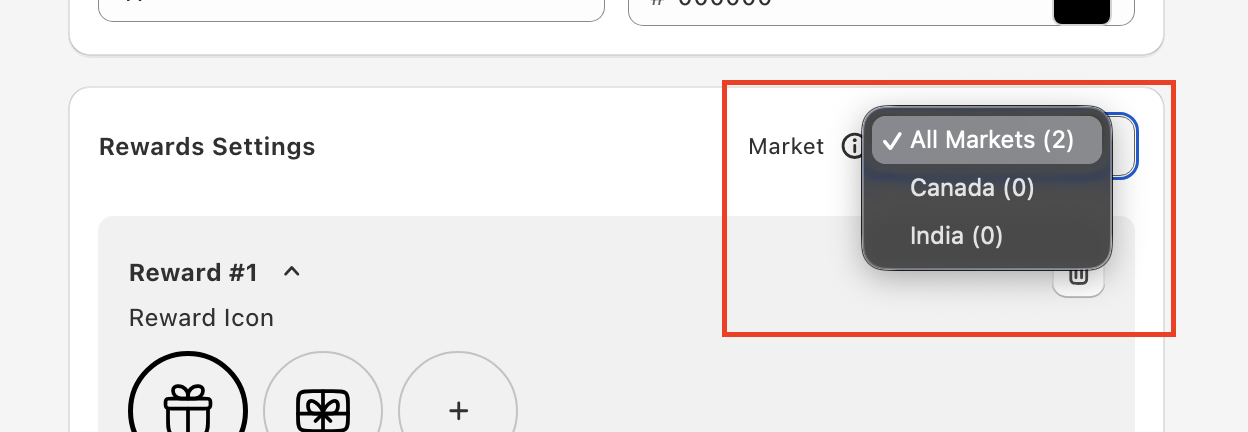
Stores that set up per-currency goals in the past see a Configure Specific Currency Goal button here instead of the Market dropdown.
Test each market
The cart preview in the Cart Editor follows the market you pick in the dropdown. To test on your store, open it in incognito and switch markets (via your Shopify Markets URL or country selector). Confirm the goal label shows the correct currency and threshold for each.