
Cart drawer header
Configure the title, logo, alignment, and close button at the top of the cart drawer.
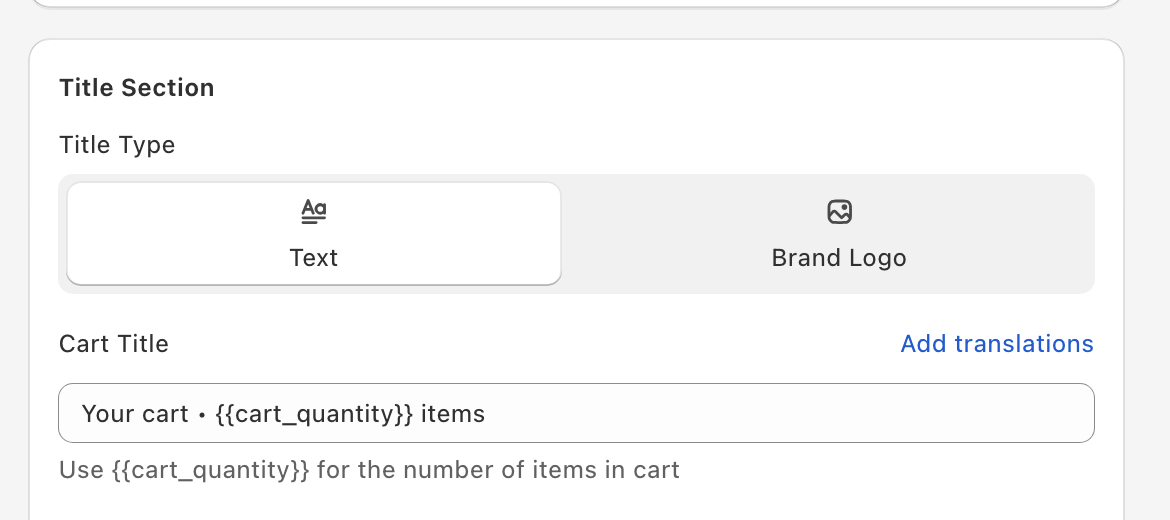
Open Cart Editor → Design and scroll to the Title Section card.
Title or logo
Use Title Type to pick Text or Brand Logo — one, not both.
- Text — set the Cart Title (default
CART • {{cart_quantity}}).{{cart_quantity}}is replaced with the number of items in the cart. - Brand Logo — click Add Logo to upload an image, then use Logo Size (14–48 px, default 32) to set its height. Because that slider sets the logo's height, a wide logo reads best — a tall one ends up very small.
Under Title Bar, set the header's Background Color, plus the Text Color and Font Size of a text title.
Alignment
Title Alignment (called Logo Alignment when you use a logo) has two options:
- Side (default) — the title sits on the side away from the close button. With the close button on the right (the default), that means left-aligned.
- Center — feels balanced, especially with a logo.
Close button
Position
Close Button Position is Right (default) or Left. Right is the convention.
Style
Under Close Icon, set the Text Color and Size (px) of the X. Use high contrast — shoppers need to be able to spot the way out of the cart.
Share button
If you turn on Enable Share Cart Button (Cart Editor → Settings → Other Settings), a share icon appears in the header next to the close button. It copies a link to the shopper's current cart.
Translation
The Cart Title field has per-language translation slots (Add translations) — see Translation text fields (global) for the full workflow.
Custom template (advanced)
If you have React (JSX) skills, you can replace the built-in header (and the checkout footer) with your own template. The Custom template card, with Header and Footer tabs, appears at the bottom of the Design panel only after you tick Enable custom template editors under Settings → Custom templates in the Oxify app and save. It needs technical skills, and our support team can't help debug custom templates.
See Custom templates for how to turn the editors on and the props each template receives.