
Cart templates and overall layout
Pick a starting template and tune width, padding, and corner radius.
Pick a starting template, then fine-tune the macro layout of the drawer. The layout controls are in Cart Editor → Settings → Cart Settings.
Cart width (desktop)
Cart Width for Desktop runs from 440px (the default) to 850px. Wider feels premium but covers more page. ~440–500px is typical and works well on most screens.
Padding
Cart Padding (0–30px, default 0) adds space around the cart panel inside the drawer. Increase carefully — on small screens, more padding leaves less room for the cart contents.
Border radius
Cart Radius (0–30px, default 0) rounds the corners of the cart. Match your theme's button/input rounding for visual consistency. If your theme uses sharp corners, keep the cart sharp; if it uses rounded buttons, match the radius.
Mobile sizing
On phones the drawer uses the full screen width, so your width setting only affects larger screens (about 1,000px and up). Padding and border radius still apply on mobile.
Templates
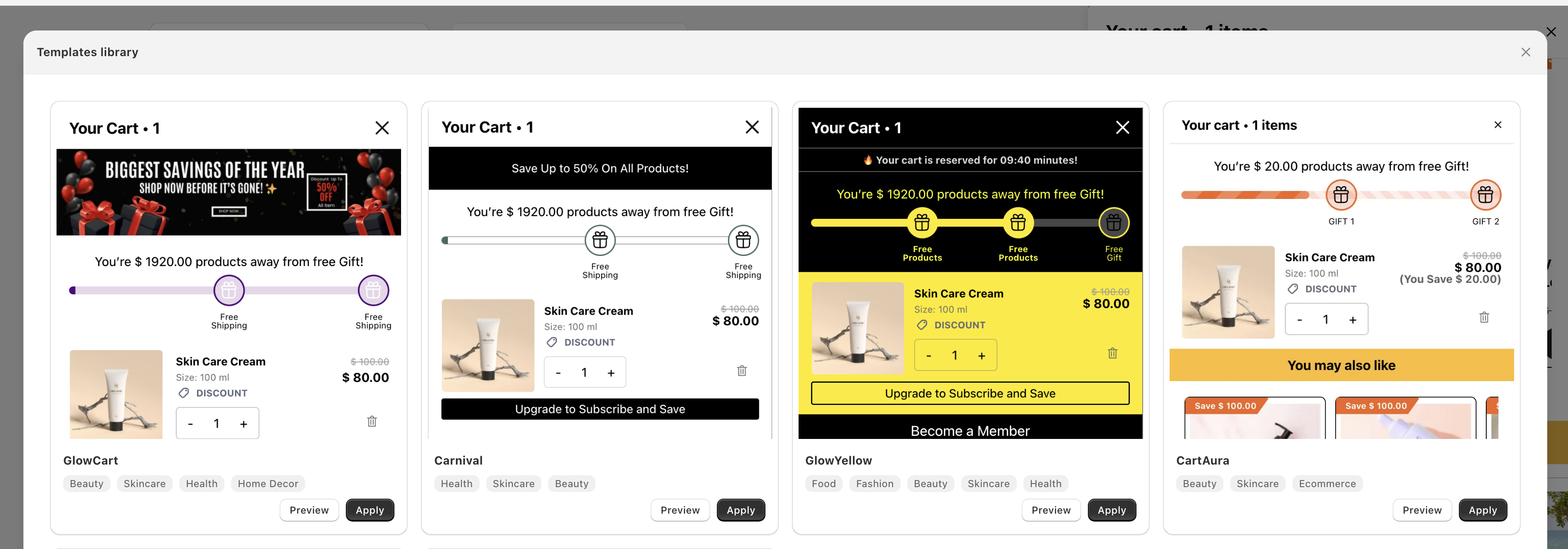
Use Cart Templates — the first item in the Cart Editor's left sidebar, above Design — for a quick preset. It opens the Templates library, where each template has a Preview button (a live preview with Apply and Cancel) and an Apply button.
Applying a template replaces the settings of each cart section the template covers — this can include texts and options, not just colors, padding and radius — so use it as a starting point before you customize. Nothing is saved until you click Save, and Discard puts your previous settings back. You can still tweak individual values afterward.
For a lighter touch there are smaller presets:
- Color Templates — the color swatches in Design → Cart Global Design. One click recolors the cart and its sections (header, items, announcement bar, rewards, upsells, buttons, and more). Only colors change.
- View Templates — in Cart Items (and in sections such as Rewards and Upsells) switches just that section's visual style. See Cart item display.