
Tiers and gifts
Set the goals of a gift campaign, choose gift products and quantities, set the gift price, and let shoppers pick their gift.
A tier is one goal and what the shopper gets for reaching it, for example "spend $75, get a free energy drink". A campaign can have several tiers that build on each other. This page covers the Tiers and gifts card of a gift campaign.
Where to find it: Oxify Cart Drawer → Rewards & Discounts → open a campaign → Tiers and gifts.
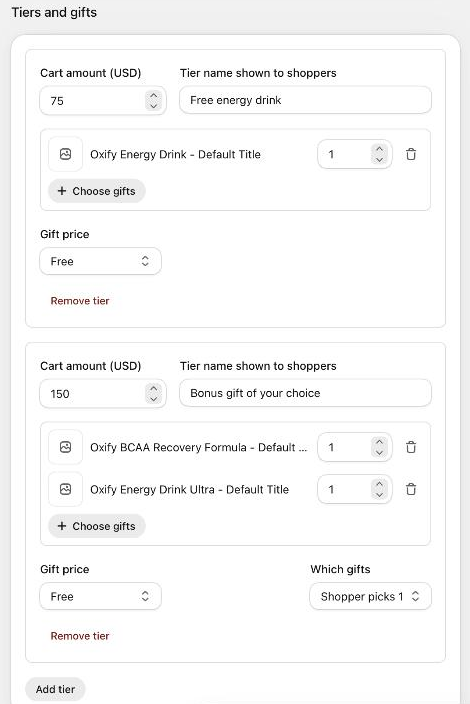
Add a tier
Click Add tier. The first tier starts at a goal of 100. Each new tier starts at double the highest goal so far; change it to what you want.
Enter the goal. The label follows the campaign's Goal: Cart amount (USD) (your store currency) or Number of items. Two tiers can't have the same goal.
Enter a Tier name shown to shoppers, for example Free tote bag. Shoppers see it in the progress text ("Spend $20.00 more to get Free tote bag").
Click Choose gifts and tick one or more product variants. Each gift appears with a Quantity field (1 to 99) and a delete icon.
Choose the Gift price and, if the tier has more than one gift, Which gifts (below).
A campaign can have up to 6 tiers, and each tier up to 10 gifts. Remove tier deletes a tier.
Every setting on a tier
| Setting | What it does | Default |
|---|---|---|
| Cart amount (USD) / Number of items | The goal the counted cart items must reach. Amounts are in your store currency; items are whole numbers. | 100 for the first tier |
| Tier name shown to shoppers | The name of the reward in the cart texts ({GIFT}). | Empty |
| Gifts and Quantity | The product variants given at this tier, and how many of each. | Quantity 1 |
| Gift price | What the shopper pays for each gift: Free, Percentage off, Amount off each or Fixed price each. Shown only when Oxify adds the gift. | Free |
| Price value | Appears for the paid options: Percent off (1 to 100), Amount (USD) off each (above 0), or the fixed price each (0 or more). | Empty |
| Which gifts | Add every gift gives all the tier's gifts. Shopper picks 1 (or 2, 3 …) lets the shopper choose. Appears when a tier has two or more gifts. | Add every gift |
The gift price only applies when How the gift is given is set to Oxify adds the gift and applies its price. When another app gives the gift, Oxify only shows it, and the other app decides the price. See How the gift is given.
Let the shopper pick a gift
Give a tier two or more gifts and set Which gifts to Shopper picks 1. In the cart, the shopper sees the gifts with a button to add the one they want. Change the button's word in Advanced settings → Cart texts and translations → Button on a gift the shopper can pick (default Add).
When a cart reaches several tiers
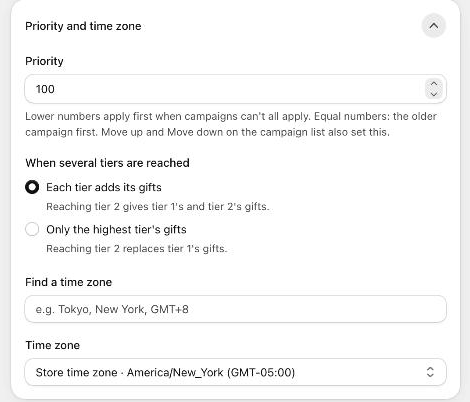
Go to Advanced settings → Priority and time zone → When several tiers are reached:
- Each tier adds its gifts (default): reaching tier 2 gives tier 1's and tier 2's gifts.
- Only the highest tier's gifts: reaching tier 2 replaces tier 1's gifts.
The campaign Summary on the right lists each tier with its goal, gifts and price, and which tier rule applies.
Gifts the app refuses
When you save, the campaign is refused with a message if a gift:
- is a gift card,
- is part of a bundle (a bundle can change the cart line and drop the gift's price),
- is the free item of an active Buy X Get Y discount in your store,
- is also a gift in the cart's Rewards (cart editor), so the two would fight over the same line,
- has no product variant any more (choose it again).
A live campaign whose gift later becomes a Buy X Get Y item or a bundle shows a warning on the campaign list: Some live gifts can't be given as they are.
Price checks
Two warnings appear in the editor to catch typing mistakes. They don't stop you from saving:
- A gift costs the buyer only $…, far below the product's price. Check that the price is intended.
- This tier's gifts are worth $…, as much as or more than its goal. Check that this is intended.
If your store uses an approval limit, a campaign whose gifts are worth more than that limit waits for a second staff member. See Combinations and store rules.
Gifts never count toward the goal
Gift lines, add-ons, cart Rewards items, other promotional items and gift cards never count toward any campaign's goal, so a gift can't push a cart over a threshold. See Products that count.