
Widget — Progress bar
Show buyers where they are after checkout: a three-step progress bar at the top of every post-purchase offer, with five styles.
The Progress bar shows three steps at the top of the offer, such as Order confirmed → Exclusive offer → All done. It tells the buyer their order is already placed and that this page is one short extra step, which makes the offer feel safe.
Where to find it: Oxify Cart Drawer → Post Purchase → open a funnel → Upsells → Edit offer → Page top → Progress bar.
Every offer has exactly one progress bar. It's pinned to the end of Page top: you can't move, duplicate or delete it, but you can switch it off. Offers made before the progress bar existed get one automatically, switched off, so nothing changes for buyers until you turn it on.
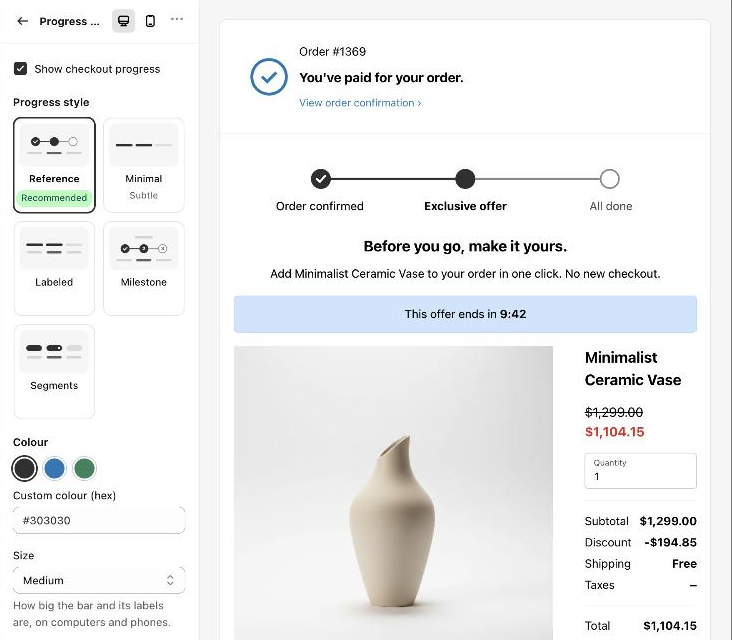
Settings
| Setting | What it does | Default |
|---|---|---|
| Show checkout progress | Shows or hides the bar. Same as ⋯ → Hide / Show on its row. | On for new offers (except the Clean minimal design) |
| Progress style | Reference (Recommended), Minimal (Subtle), Labeled, Milestone or Segments. See below. | Reference |
| Colour | The colour of the reached steps: Charcoal, Checkout blue or Green. Upcoming steps stay grey. | Charcoal |
| Custom colour (hex) | Any colour as #rrggbb, for example #303030. A wrong value shows "Use a hex colour like #303030." | #303030 |
| Size | Small, Medium or Large: how big the bar and its labels are, on computers and phones. | Medium |
| Caption above the bar | Milestone style only. Small text above the bar. | "Step 2 of 3" |
| Step 1 label, Step 2 label, Step 3 label | The words under each step, up to 40 characters each. Buyers see them exactly as you type them; one or two words fit best on phones. | Order confirmed, Exclusive offer, All done |
| Space above and below, Space at the sides | Spacing around the bar: None, Tight, Loose, Extra loose. | Tight, None |
The default labels and caption are written in your admin language when the offer is created. Edit them to match your store's language.
The five styles
Circles joined by a line, with labels under them. Step 1 shows a tick, step 2 is filled, step 3 is empty. The recommended style.

What buyers see
The bar always shows the buyer on step 2 of 3: step 1 (the paid order) is done, step 2 is the offer, step 3 is still ahead. It looks the same on Upsell 2, Upsell 3 and the downsells; it doesn't move forward from one offer to the next.
On phones the bar is drawn narrower so the circles and labels still fit.
Page designs and the progress bar
| Design | Progress bar |
|---|---|
| Product spotlight, With timer | Reference, Medium |
| Bold hero | Milestone, Medium |
| Quick add, Restock another | Labeled, Small |
| Clean minimal | Switched off |
Applying a design changes the style and size, but keeps your colour and caption. See The offer editor.
Turn it off
Untick Show checkout progress, or use ⋯ → Hide on the Progress bar row. The row then shows a Hidden badge. Click Done, then Save the funnel.