
Activity, alerts and refunds
See repeat-gift and refund alerts, the change log of gift campaigns, the tags Oxify adds to campaign orders, and the Shopify Flow trigger for refunds below the goal.
After a campaign goes live, Oxify watches the orders it touches: it flags customers who get the same gift again, orders that keep a gift after a refund takes them below the goal, and it logs every change your team makes to campaigns.
Where to find it: Oxify Cart Drawer → Rewards & Discounts → Activity (button in the page header).
When there are new alerts, the campaign list shows a banner, for example 2 new gift alerts (repeat gifts or refunds below the goal)., with a View activity button.
Alerts
Each alert lists When, the Alert, the Order (a link to the order in Shopify), the Campaign and Details. New alerts carry a New badge; Mark all as seen clears them.
| Alert | What happened | What to do |
|---|---|---|
| Repeat gift | A customer already got this campaign's gift, up to its Gifts per customer limit. Details say what matched: the customer account, email, phone or shipping address. Guest orders are caught too. | Check the order and decide whether to remove the gift before it ships. |
| Gift kept after a refund below the goal | A refund left the order under the goal of a gift the buyer kept. Details show what is left after refunds and the goal. | Decide whether to ask for the gift back or charge for it. |
| Gift not recorded for the customer | The per-customer limit couldn't be updated with this gift. Oxify keeps retrying automatically; it shows Recorded on a later try. once it works. | Usually nothing. |
| Approval limit raised or removed | A staff member changed the approval limit in Store rules → Safety. | Check the change was intended. |
Logged-in customers who reached the Gifts per customer limit are stopped at payment by the gift guard. Guests can't be stopped at payment, so their repeat orders are flagged here instead.
Order tags
Oxify tags orders so you can find them in Shopify → Orders:
| Tag | Added to |
|---|---|
Oxify: repeat gift | Orders flagged as a repeat gift. |
Oxify: gift below goal after refund | Orders where a refund left a kept gift below the goal. |
Oxify campaign: <label> | Each order that earned a campaign's reward, with the campaign's label. |
Oxify gift value: <amount> <currency> | Orders that got a campaign gift, with the gift's value in your store currency, so a return can be judged. |
Shopify Flow: refunds below the goal
Oxify adds a Shopify Flow trigger, Gift order refunded below goal: "A refund left the order under the goal of an Oxify gift campaign while the buyer kept the free gift." It runs once per order and campaign, right after the order is tagged Oxify: gift below goal after refund.
It passes the order and these fields to your workflow: Campaign name, Goal type (AMOUNT for order value in the store currency, QUANTITY for the number of items), Goal, and Counted after refund.
Open the Shopify Flow app and create a workflow.
Choose the trigger Gift order refunded below goal (from Oxify Cart Drawer).
Add the actions you want, for example send an internal email to your team, or add an order note.
Turn the workflow on.
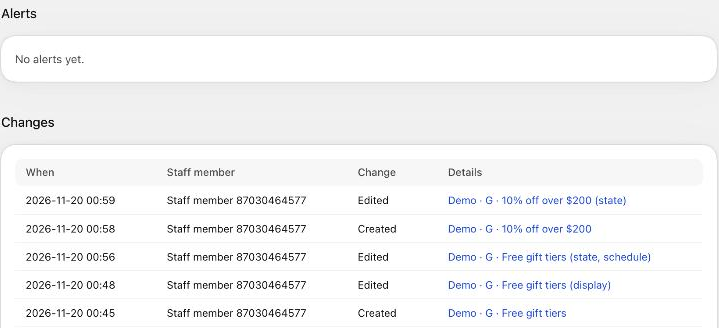
Changes
The Changes table logs every change to campaigns and store settings, newest first: When (in your browser's time), the Staff member, the Change (Created, Edited, Deleted, Ended, Duplicated, Activated (bulk), Paused (bulk), Ended (bulk), Duplicated (bulk), Priority changed, Store rules changed, Gift discount settings changed, Approved, Approval requested) and Details (the campaign, with what changed, for example "(state, schedule)"). Use Newer and Older to page through it.