
Cart texts and translations
Change what shoppers read in a gift campaign's cart card, use the {AMOUNT} and {GIFT} tokens, and translate the texts.
Each campaign shows a card in the cart drawer with a message, a progress bar and the gifts. You can change every word of it and translate it for each storefront language.
Where to find it: Oxify Cart Drawer → Rewards & Discounts → open a campaign → In the cart and Advanced settings → Cart texts and translations.
In the cart
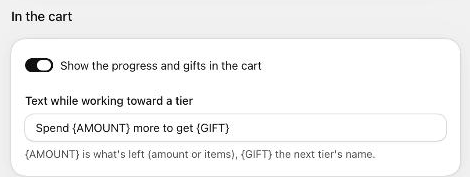
| Setting | What it does | Default |
|---|---|---|
| Show the progress and gifts in the cart | Shows the campaign's card in the cart drawer. Turn it off to run the campaign without a card; the reward still applies. | On |
| Text while working toward a tier | The message above the progress bar. {AMOUNT} is what's left (an amount or a number of items), {GIFT} the next tier's name. | Spend {AMOUNT} more to get {GIFT} (free shipping campaigns: Spend {AMOUNT} more for free shipping) |
The campaign's Label shown to shoppers (Basics) appears as the card's heading, and each tier's Tier name shown to shoppers fills {GIFT}.
Cart texts and translations
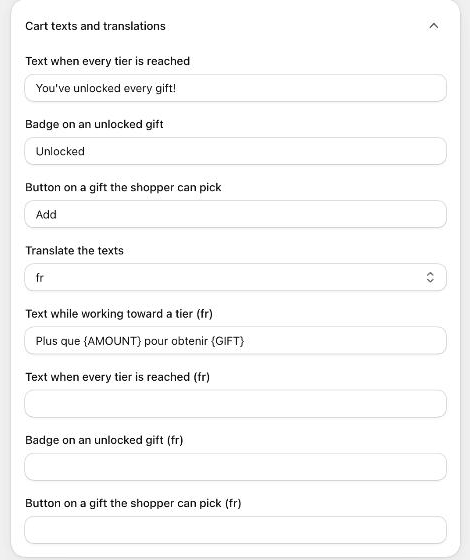
| Setting | What it does | Default |
|---|---|---|
| Text when every tier is reached | Replaces the progress message once the last tier is reached. | You've unlocked every gift! (order discount: You've unlocked your reward!, free shipping: You've unlocked free shipping!) |
| Badge on an unlocked gift | The small label next to a gift (or an order discount or free shipping) the shopper has earned. | Unlocked |
| Button on a gift the shopper can pick | The button on each gift when a tier uses Shopper picks 1 (or more). | Add |
| Translate the texts | Choose a language to show translation fields for every text above, marked with the language code, for example Text while working toward a tier (fr). | Choose a language |
Translate the texts
Open Advanced settings → Cart texts and translations.
In Translate the texts, choose a language code, for example fr.
Fill in the fields marked with that code. Keep the tokens ({AMOUNT}, {GIFT}) as they are; only translate the words around them.
Repeat for other languages, then click Save.
Shoppers see the translation for the language of the storefront they are browsing.
You don't have to translate the default texts. As long as a text is still the built-in default, the cart shows Oxify's own translation in Danish, German, Spanish, French, Italian, Japanese, Portuguese and Chinese (Simplified and Traditional). A text you changed is never translated automatically, so add your own translation for it.
Messages the cart adds by itself
Some short notes appear in the card without any setting, in the shopper's language, for example:
- Not available with your discount code. (the campaign doesn't combine with the code in the cart),
- Can't be combined with another gift offer in your cart.,
- The gift limit per order has been reached.,
- A better store discount is applied instead (another discount saves the shopper more).
See Combinations and store rules for when they appear.