
Rewards & Discounts overview
Gift campaigns, order and free-shipping campaigns, and display-only store gifts: what the Rewards & Discounts page does and when to use it instead of cart Rewards.
The Rewards & Discounts page runs scheduled promotions in your cart: free or reduced-price gifts, a discount off the order, or free shipping once a shopper reaches a goal. It is for merchants who plan promotions ahead (a holiday gift, a launch week, a VIP offer) and want them to start and stop on their own.
Where to find it: Oxify Cart Drawer → Rewards & Discounts.
Three ways to give gifts in the cart
Oxify has three separate gift features. They look alike in the cart, but they work differently. Pick one per kind of reward so shoppers never see two systems at once.
| Cart Rewards | Gift campaigns | Store gifts | |
|---|---|---|---|
| Where you set it up | Cart editor → Rewards | Rewards & Discounts → Create campaign | Rewards & Discounts → Set up store gifts |
| What it gives | Free gifts, an order discount or free shipping at cart goals | Gifts, an Order discount or Free shipping at cart goals | Nothing. It only shows the gifts your checkout already adds |
| Start and end dates | No, it is always on | Yes, start and end date and time in any time zone | Yes, read from your metaobject entries |
| Several at once | One set of tiers | Many campaigns, with priority and combination rules | Up to three extra "Included at checkout" lists |
| Who can get it | All shoppers (with excluded customer tags) | Requirements, customer tags, first order, unlock code, per-market goals, a limit per customer | Everyone, logged-in customers with a tag, or carts with a product from a collection |
| Who adds the gift to the cart | Oxify | Oxify, or another app / Shopify discount | Your checkout (another app or Shopify feature) |
When to use which
- Use cart Rewards for one always-on offer, such as free shipping over $50 and a free gift over $100. It is set up in the cart editor with the progress bar. See How free gifts work.
- Use gift campaigns for promotions with dates, several offers in a row (this month's gift, next month's gift), offers for some customers only, or when you need a log of who changed what. See Create a gift campaign.
- Use store gifts when another app or a Shopify feature already adds the gift at checkout and you keep the tiers in Shopify metaobjects. Oxify then only shows the progress and the gifts in the drawer, so the drawer and checkout always match. See Store gifts from metaobjects.
Don't run the same kind of reward in two places. A gift campaign can't use a gift product that is also a cart Rewards gift, an order-discount or free-shipping campaign waits while cart Rewards gives the same kind of reward, and the store gifts page warns you while cart Rewards gift tiers are on.
What's on the page
From top to bottom:
- Activity and Create campaign buttons in the page header. Pause all campaigns appears there while a campaign is live or scheduled.
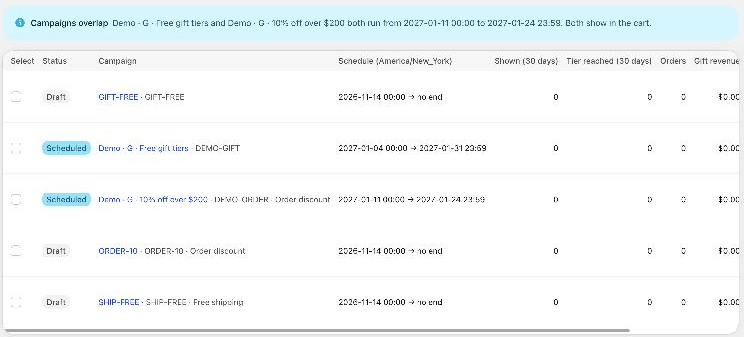
- Warnings, when there is something to fix (for example campaigns that overlap, or the app embed is off). See Troubleshooting.
- The campaign list: every campaign with its status, schedule and 30-day results. See Manage campaigns.
- Next 90 days: a timeline of your active campaigns.
- Combinations: which active campaigns can apply together, a Try a cart simulator and the most one order can get. See Combinations and store rules.
- Store rules: what happens when campaigns can't all apply, limits per order, how the cart shows several campaigns, and safety settings.
- Gift discount: the Shopify discount that prices campaign gifts, the gift guard, a grace period and a test mode. See How the gift is given.
- Gifts from your store's metaobjects: the way into store gifts.
Pages in this section
Create a gift campaign
Step by step: basics, goal, reward, tiers, schedule, save and switch on.
Tiers and gifts
Goals, gift products, quantities, gift price and letting the shopper pick.
Products that count
Which cart items count toward the goal, and what never counts.
Schedule, priority and status
Start and end times, time zones, the on/off switch and campaign statuses.
Order discount and free shipping campaigns
Campaigns that take money off the order or make shipping free.
How the gift is given
Oxify adds the gift, or another app does. The gift discount, guard and test mode.
Requirements and who sees it
Required products, logged-in customers, customer tags, first order, unlock codes, markets and limits.
Cart texts and translations
The words shoppers see and how to translate them.
Combinations and store rules
Campaigns together, discount codes, cart Rewards, Shopify discounts and per-order limits.
Show campaigns in the cart drawer
Place campaigns in the cart editor and preview them in your store.
Manage campaigns
The campaign list, results, bulk actions, priority order and the 90-day timeline.
Activity, alerts and refunds
Repeat gifts, refunds below the goal, order tags, Shopify Flow and the change log.
Store gifts from metaobjects
Show gift tiers you keep in Shopify metaobjects, display only.
Troubleshooting
Warnings on the page and what to do about them.