
Combinations and store rules
Decide which gift campaigns apply together, with discount codes, cart Rewards and other Shopify discounts, and set per-order limits, the cart display and safety rules.
When a cart qualifies for several promotions at once, two layers decide what the shopper gets: each campaign's Combinations section, and the store-wide Store rules on the campaign list. The Combinations card on the list shows the result and lets you try a cart.
Where to find it:
- Per campaign: Rewards & Discounts → open a campaign → Advanced settings → Combinations.
- For the whole store: Rewards & Discounts → Combinations and Store rules (on the campaign list).
A campaign's Combinations section
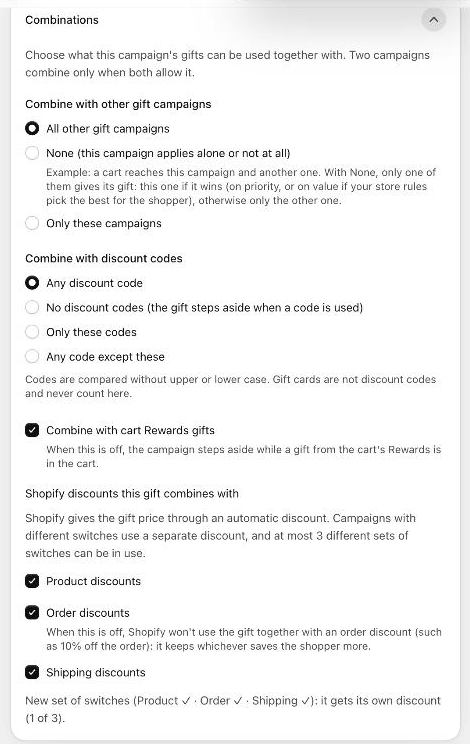
Choose what this campaign's gifts can be used together with. Two campaigns combine only when both allow it.
| Setting | Options | Default |
|---|---|---|
| Combine with other gift campaigns | All other gift campaigns; None (this campaign applies alone or not at all); Only these campaigns (tick them in the list). | All |
| Combine with discount codes | Any discount code; No discount codes (the gift steps aside when a code is used); Only these codes; Any code except these. For the last two, type codes separated by commas or press Enter after each, or click Add code. Upper and lower case don't matter. Gift cards are not discount codes and never count here. | Any discount code |
| Combine with cart Rewards gifts | When this is off, the campaign steps aside while a gift from the cart's Rewards is in the cart. | On |
| Shopify discounts this gift combines with | Product discounts, Order discounts, Shipping discounts. See below. Only for campaigns where Oxify gives the gift. | All on |
Example of None: a cart reaches this campaign and another one. Only one of them gives its gift: this one if it wins (on priority, or on value if your store rules pick the best for the shopper), otherwise only the other one.
If one campaign allows another but not the other way round, the editor warns Some campaigns won't combine and tells you which campaign to change. The editor never changes other campaigns for you.
For a campaign where another app gives the gift, a note says These settings only change what the cart drawer shows; the other system decides what checkout gives.
Shopify discounts this gift combines with
Shopify gives the gift price through an automatic discount. These switches decide which of your other Shopify discounts can apply on the same order:
- Product discounts: other product discounts (for example a sale price discount).
- Order discounts: when off, Shopify won't use the gift together with an order discount (such as 10% off the order); it keeps whichever saves the shopper more.
- Shipping discounts: free or reduced shipping discounts.
Campaigns with different switches use a separate discount, and at most 3 different sets of switches can be in use. Under the switches, the editor says whether this campaign shares a set with other campaigns, or gets a new one (for example "1 of 3"). If all three sets are in use, choose the same switches as one of them, or the campaign can't be saved as active.
The Combinations card on the campaign list
Once at least one campaign where Oxify gives the gift is active (live or scheduled), the card shows:
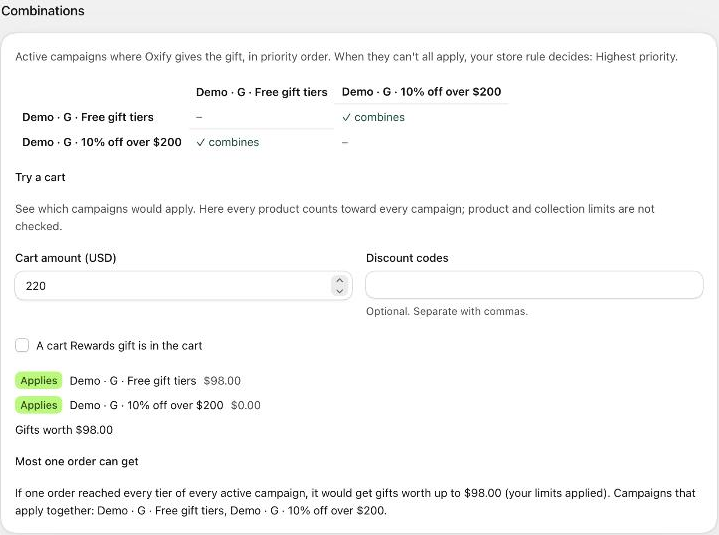
- A matrix of active campaigns in priority order: ✓ combines, or why two don't (one-sided: … refuses, both refuse, Shopify switches). It appears when two or more campaigns are active.
- Try a cart: enter a Cart amount (and Items in the cart if a campaign counts items), optional Discount codes, and tick A cart Rewards gift is in the cart to see which campaigns would apply. Each campaign gets a badge: Applies, Goal not reached, Not with this code, Steps aside for the Rewards gift, Doesn't combine, Left out by your gift limits or Not for this buyer. Here every product counts toward every campaign; product and collection limits are not checked. Nothing you type is saved.
- When campaigns have conditions, Try a cart also asks for a Logged-in customer, Customer tags, Earlier orders and a Market.
- Most one order can get: the gift value one order would get if it reached every tier of every active campaign, with your limits applied, and which campaigns apply together.
Store rules
| Setting | What it does | Default |
|---|---|---|
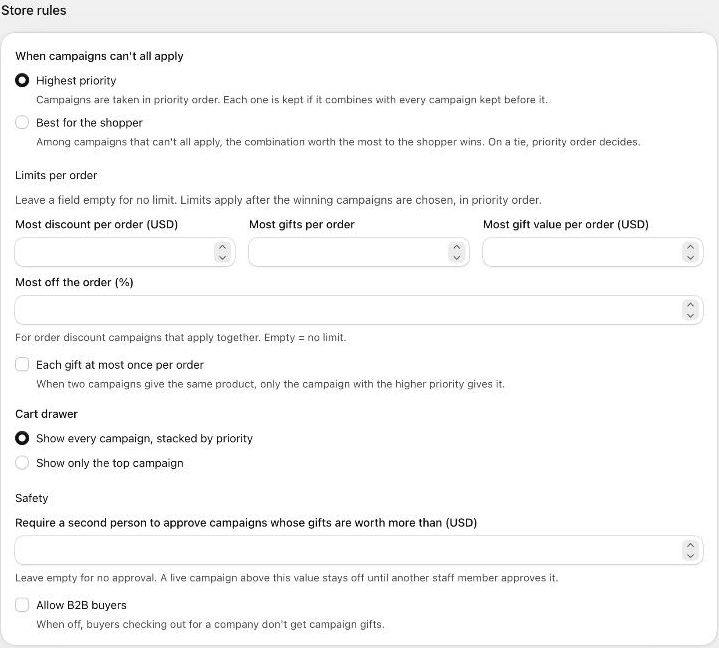
| When campaigns can't all apply | Highest priority: campaigns are taken in priority order; each one is kept if it combines with every campaign kept before it. Best for the shopper: among campaigns that can't all apply, the combination worth the most to the shopper wins; on a tie, priority order decides. | Highest priority |
| Most discount per order (USD) | A cap on the total discount campaigns give one order. | Empty (no limit) |
| Most gifts per order | A cap on the number of campaign gifts in one order. | Empty |
| Most gift value per order (USD) | A cap on the value of campaign gifts in one order. | Empty |
| Most off the order (%) | For order discount campaigns that apply together. | Empty |
| Each gift at most once per order | When two campaigns give the same product, only the campaign with the higher priority gives it. | Off |
| Cart drawer | Show every campaign, stacked by priority, or Show only the top campaign. | Show every campaign |
Leave a limit empty for no limit. Limits apply after the winning campaigns are chosen, in priority order.
Safety
| Setting | What it does | Default |
|---|---|---|
| Require a second person to approve campaigns whose gifts are worth more than (USD) | A live campaign above this value stays off until another staff member approves it. The campaign shows Awaiting approval; another staff member opens it and clicks Approve. The person who asked can't approve it. Leave empty for no approval. | Empty |
| Allow B2B buyers | When off, buyers checking out for a company don't get campaign gifts. | Off |
Raising or removing the approval limit creates an alert under Activity.
Store rules apply to every campaign in your store and have their own Save bar. Change them on purpose: a cap or a "top campaign only" rule changes what every shopper gets.
Discount codes and other discounts in practice
- In the cart, a campaign that doesn't combine with the shopper's code shows Not available with your discount code. and gives nothing while the code is applied.
- If another store discount saves the shopper more than a campaign's reward, the card shows A better store discount is applied instead.
- Whether Shopify applies a campaign together with a discount from Shopify or another app depends on both discounts' combination settings. Gift campaigns are product discounts, order campaigns order discounts and free-shipping campaigns shipping discounts; both discounts must allow each other's type, and two shipping discounts never combine. Change another discount's settings in Shopify → Discounts.