
Order discount and free shipping campaigns
Create a campaign that takes a percentage or an amount off the order, or makes shipping free, once the shopper reaches a goal.
A campaign doesn't have to give a product. Set its Reward to Order discount to take money off the whole order, or to Free shipping to make shipping free, once the cart reaches the goal. Everything else (schedule, goal, products that count, requirements, combinations) works as for gift campaigns.
Where to find it: Oxify Cart Drawer → Rewards & Discounts → Create campaign → Reward.
The three reward types
| Reward | What the shopper gets |
|---|---|
| Gifts | Free or reduced-price products added to the cart. |
| Order discount | A percentage or an amount off the whole order once the goal is met. Gifts and other promotional lines are never discounted by it. |
| Free shipping | Free shipping once the goal is met. |
Create an order discount campaign
Click Create campaign, enter a Name (only you see it) and, if you want, a Label shown to shoppers such as SPRING-10.
Under Reward, choose Order discount.
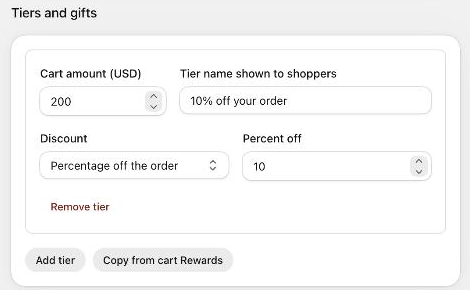
Under Tiers and gifts, click Add tier. Enter the goal (Cart amount or Number of items) and a Tier name shown to shoppers, for example 10% off your order.
Choose the Discount: Percentage off the order (enter Percent off, 1 to 100) or Amount off the order (enter the amount in your store currency). A new tier starts at 10% off.
Add more tiers if you want (for example 10% at $200, 15% at $300). Set the Schedule, switch the campaign On and click Save.
Discount tiers replace each other: when you switch a campaign to Order discount or Free shipping, When several tiers are reached is set to Only the highest tier's gifts, so a cart that reaches 15% gets 15%, not 10% + 15%.
Create a free shipping campaign
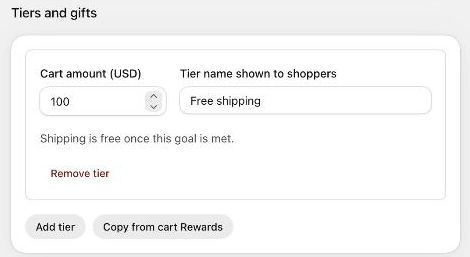
Choose Free shipping under Reward, then Add tier and enter the goal. A free shipping tier has no value to set: Shipping is free once this goal is met.
The cart texts follow the reward type. A new free shipping campaign starts with Spend {AMOUNT} more for free shipping and You've unlocked free shipping!; an order discount campaign with You've unlocked your reward!. Texts you wrote yourself are kept when you switch the type.
Copy tiers from cart Rewards
If cart Rewards (cart editor) already gives an order discount or free shipping, click Copy from cart Rewards under the tiers to copy its goals and values into the campaign. Tiers without a goal or value are skipped.
So an order is never discounted twice, an order discount or free shipping campaign gives nothing while cart Rewards has tiers of the same kind. The campaign shows Waiting: cart Rewards already gives order discounts (or free shipping) and the badge Waits for cart Rewards on the campaign list. Turn those tiers off in the cart editor (Open the cart editor) and the campaign starts on its own.
What's different from gift campaigns
- No gift price, no Which gifts: there are no products to give.
- Limits per customer and the approval limit apply to gift campaigns only. The Limits section says so.
- Shopify applies the reward as an order or shipping discount. Whether it combines with your other Shopify discounts depends on both discounts' combination settings; two shipping discounts never combine. See Combinations and store rules.
- In Store rules, Most off the order (%) caps what order discount campaigns that apply together can take off.
- In the cart, an unlocked order discount or free shipping appears in the campaign card with its Badge on an unlocked gift text (default Unlocked). Checkout applies it.