
How the gift is given
Choose whether Oxify adds and prices a campaign's gift or only shows it, and set up the gift discount, gift guard, grace period and test mode.
A campaign can give the gift itself, or only show a gift that another app or a Shopify discount gives. This page explains both, and the store-wide Gift discount card that prices campaign gifts at checkout.
Where to find it: Oxify Cart Drawer → Rewards & Discounts → open a campaign → Advanced settings → How the gift is given, and the Gift discount card on the campaign list.
Who adds the gift and gives the price
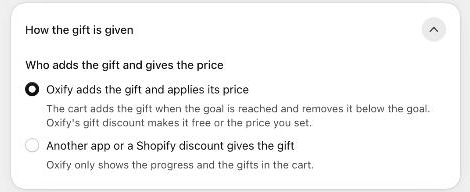
| Option | What happens |
|---|---|
| Oxify adds the gift and applies its price (default) | The cart adds the gift when the goal is reached and removes it below the goal. Oxify's gift discount makes it free or the price you set in the tier's Gift price. |
| Another app or a Shopify discount gives the gift | Oxify only shows the progress and the gifts in the cart. The other app or discount adds the gift and decides its price. |
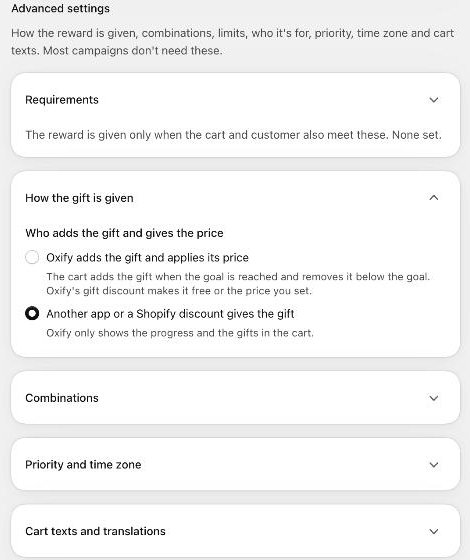
Use Another app or a Shopify discount gives the gift when a Shopify automatic discount (for example Buy X Get Y) or another app already gives the gift, and you only want the Oxify cart to show the progress. In that mode:
- the tier's Gift price and Which gifts options are not used: the other system decides,
- the gifts in the cart card read Added at checkout instead of an add button,
- Combinations settings only change what the cart drawer shows; the other system decides what checkout gives,
- the Limits and Who and where sections disappear from Advanced settings (Oxify enforces nothing at checkout for this campaign),
- no Oxify discount is created for the campaign.
When Oxify adds the gift
- In the cart: as soon as the counted items reach a tier's goal, the drawer adds the tier's gifts as separate cart lines (or shows the gifts to pick from, with Shopper picks). If the cart drops below the goal, the drawer removes them.
- At checkout: the Oxify gift campaigns discount in Shopify → Discounts prices every campaign gift (free, or the price you set). It checks the campaign again, so a gift is only discounted while the cart still qualifies.
- At payment: the gift guard checks the rules a shopper could get around in the cart: the goal after discounts, the per-customer limit, logged-in customers only and B2B buyers.
- After the order: orders are tagged and checked for repeat gifts and refunds. See Activity, alerts and refunds.
Gift lines never count toward any goal, so a gift can't push the cart over a threshold.
The Gift discount card
The card appears on the campaign list once a campaign lets Oxify apply the gift.
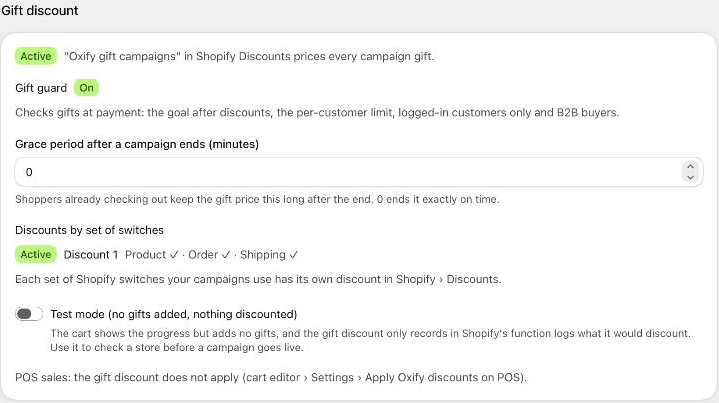
| Item | What it means |
|---|---|
| Status badge | Active: "Oxify gift campaigns" in Shopify Discounts prices every campaign gift. Not created: it is created when a campaign lets Oxify apply the gift. Deleted in Shopify: gifts are charged at full price until it is recreated. Needs attention: the last update did not reach Shopify; gifts may be charged at full price. |
| Recreate the gift discount | Appears when the discount or the gift guard is missing or needs attention. Click it to set them up again. |
| Gift guard | On when Shopify checks gifts at payment. Off, Missing or Needs attention mean the rules above aren't checked at payment (see below). |
| Grace period after a campaign ends (minutes) | Shoppers already checking out keep the gift price this long after a campaign ends. 0 ends it exactly on time. Whole minutes from 0 to 240. |
| Discounts by set of switches | Each set of Shopify combination switches your campaigns use has its own discount in Shopify → Discounts (Discount 1, Discount 2 …), at most 3. See Combinations and store rules. |
| Test mode (no gifts added, nothing discounted) | The cart shows the progress but adds no gifts, and the gift discount only records in Shopify's function logs what it would discount. Use it to check a store before a campaign goes live. |
| POS line | Says whether the gift discount applies to POS sales. Change it in the cart editor: Settings → Apply Oxify discounts on POS. |
The Gift discount card is a store-wide setting with its own Save bar: a change here affects every campaign. Don't delete the "Oxify gift campaigns" discounts in Shopify → Discounts: without them, campaign gifts are charged at full price.
Gift guard
The gift guard is a Shopify checkout rule that Oxify sets up for you. It enforces, at payment, the settings a shopper could otherwise get around in the cart:
- Check the goal after discounts (Limits),
- Gifts per customer (Limits),
- Customer is logged in (Requirements),
- Allow B2B buyers (Store rules → Safety).
If it is switched off in Shopify → Settings → Checkout → Checkout rules, or couldn't be set up, the campaign list and each campaign show The gift guard isn't protecting your gifts. Switch it back on in Shopify, or click Recreate the gift discount.