
Requirements and who sees it
Limit a gift campaign to carts with certain products, logged-in customers, customer tags, first orders, an unlock code or certain markets, and cap gifts per customer.
Most campaigns are for every shopper. When a reward is only for some carts or some customers, use three sections under Advanced settings: Requirements (what must be in the cart, and logged-in customers), Who and where (customer tags, first order, an unlock code, goals per market) and Limits (gifts per customer, how the goal is checked).
Where to find it: Oxify Cart Drawer → Rewards & Discounts → open a campaign → Advanced settings.
Who and where and Limits only appear when How the gift is given is Oxify adds the gift and applies its price. When another app gives the gift, that app decides who gets it.
Requirements
Requirements are extra conditions on top of the goal. With none set, the section says None set.
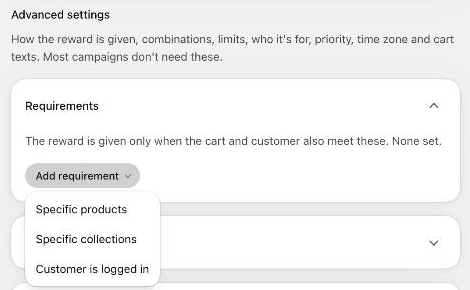
Open Requirements and click Add requirement.
Pick one:
- Specific products: At least a number of item(s) from any of these products. Click Choose products.
- Specific collections: the same, for products in the collections you choose.
- Customer is logged in: Only logged-in customers get the reward.
Add more requirements if you need them. With two or more, choose When multiple requirements are set: All requirements must be met or Any requirement must be met.
Choose Show the campaign in the cart:
- Always, with the checklist: shoppers see the campaign straight away, with a checklist of what is still missing.
- Only once the requirements are met: the campaign stays hidden until the cart and customer meet the requirements.
Save the campaign.
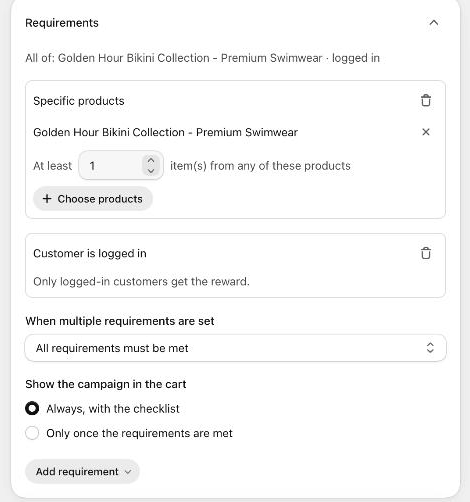
The line under the heading sums up what you set, for example "All of: … · logged in". You can also reach this section from Products that count → Also require a product in the cart?.
Products that count decides what adds up toward the goal. Requirements decide what else must be true. Example: count the whole cart toward a $100 goal, but require at least one item from the new collection.
Who and where
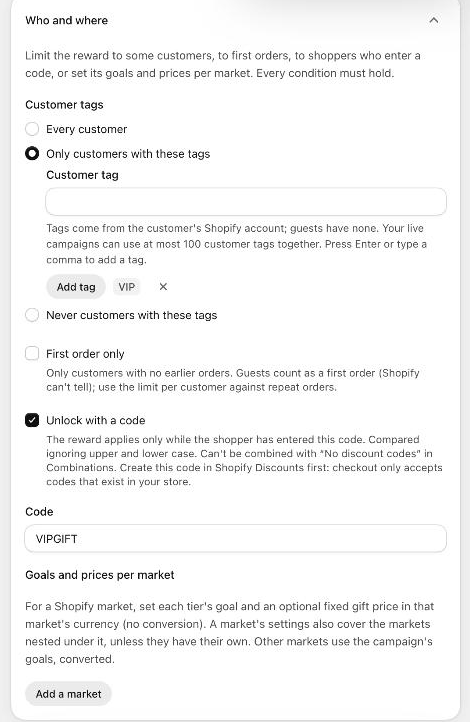
Every condition here must hold for the reward to apply.
| Setting | What it does | Default |
|---|---|---|
| Customer tags | Every customer, Only customers with these tags or Never customers with these tags. Type a tag and press Enter (or a comma), or click Add tag. Tags come from the customer's Shopify account, so guests have none: they never pass "only", and always pass "never". Your live campaigns can use at most 100 customer tags together. | Every customer |
| First order only | Only customers with no earlier orders. Guests count as a first order (Shopify can't tell), so use Gifts per customer against repeat orders. | Off |
| Unlock with a code | The reward applies only while the shopper has entered this Code. Upper and lower case don't matter. | Off |
| Goals and prices per market | For a Shopify market, set each tier's goal and an optional fixed gift price in that market's currency, with no conversion. A market's settings also cover the markets nested under it, unless they have their own. Other markets use the campaign's goals, converted. Click Add a market and choose one. Up to 20 markets. | None |
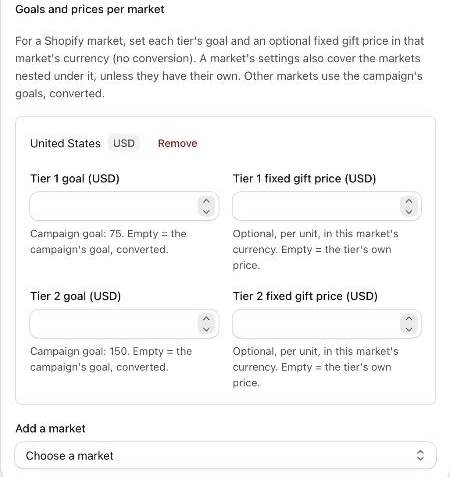
Each market box shows the market's currency, a Tier N goal field (empty = the campaign's goal, converted) and an optional Tier N fixed gift price per unit, and a Remove link.
Unlock codes
Create the code in Shopify → Discounts first. Checkout only accepts codes that exist in your store, so a code that exists only in Oxify can't be entered at checkout.
In the campaign, tick Unlock with a code and enter the same Code.
In Combinations, keep Combine with discount codes on anything except No discount codes. A campaign that needs a code can't refuse every code, and saving is refused until you change one of the two.
If the code isn't a discount code in Shopify, the campaign still saves, with the warning The unlock code … isn't a discount code in Shopify.
Limits
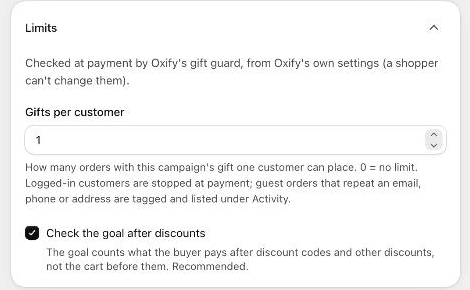
These are checked at payment by Oxify's gift guard, from Oxify's own settings, so a shopper can't change them.
| Setting | What it does | Default |
|---|---|---|
| Gifts per customer | How many orders with this campaign's gift one customer can place. 0 = no limit. Logged-in customers are stopped at payment. Guest orders that repeat an email, phone or address are tagged and listed under Activity. | 1 |
| Check the goal after discounts | The goal counts what the buyer pays after discount codes and other discounts, not the cart before them. Recommended. | On |
Limits per customer apply to gift campaigns only. Order discount and free-shipping campaigns show Limits per customer and approval apply to gift campaigns only.
These rules are enforced at payment by the gift guard, a Shopify checkout rule Oxify sets up. If it is switched off in Shopify → Settings → Checkout → Checkout rules, the campaign shows The gift guard isn't protecting your gifts and these rules aren't checked at payment. See How the gift is given.
Test who gets it
With at least one active or scheduled campaign where Oxify gives the gift, the Combinations card on the campaign list has a Try a cart simulator. When campaigns have conditions, it also asks for a Logged-in customer, Customer tags, Earlier orders and a Market, and marks a campaign Not for this buyer with the reason (for example "The customer's tags don't match."). See Combinations and store rules.