
Enable the app embed
Turn on the Oxify Announcement Bar app embed in your theme so the bar can render on your storefront.
The app embed is what lets the bar render on your storefront. Until it is Active, no announcement will show — even a published one.
Enable it from the app
Open Oxify Announcement Bar in your Shopify admin.
On the Home page, find the Theme store app embed card. It shows On or Off.
If it shows Off, click Activate (or App embed Settings). The theme editor opens with the app embed already selected.
Change the status from Disabled to Active.
Click Save.
Enable it from the theme editor
Go to Online Store → Themes.
Click Customize on your live theme.
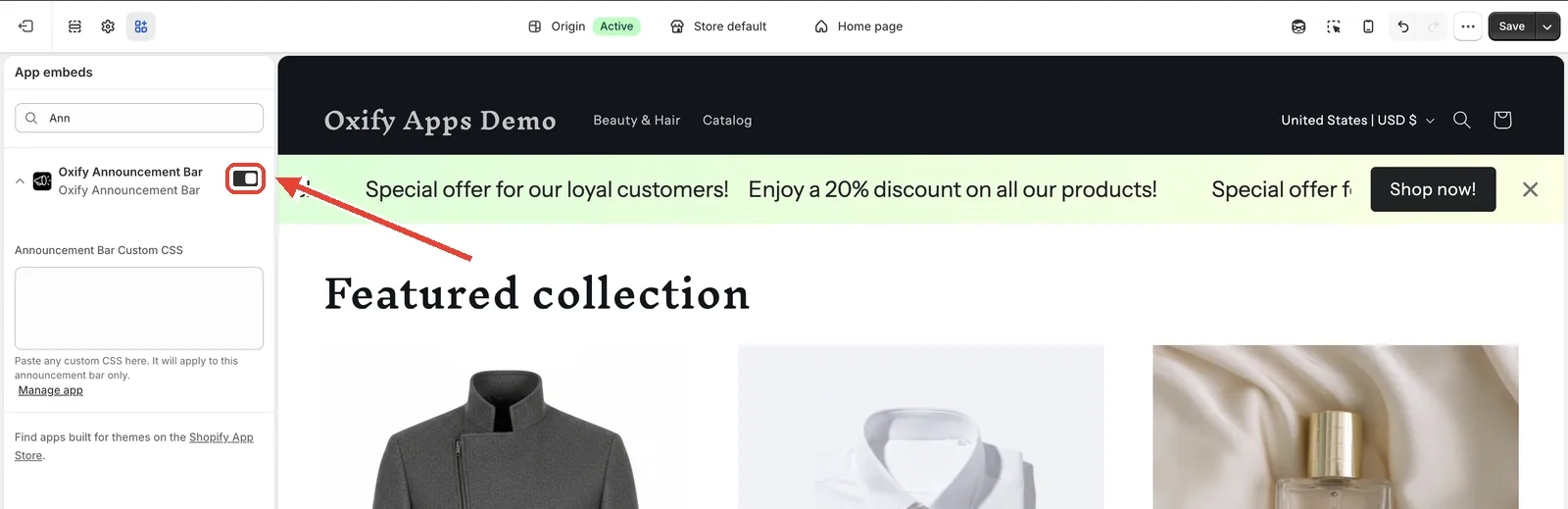
Open the App embeds panel (the puzzle-piece icon in the left sidebar).
Find Oxify Announcement Bar and toggle it on.
Click Save.
Switching themes
The app embed is stored per theme. If you publish a new theme, or duplicate one, enable the app embed again on the new theme.