
Dashboard tour
What each part of the Oxify Announcement Bar home page does.
Open Apps → Oxify Announcement Bar to land on the dashboard. The sections appear in this order.
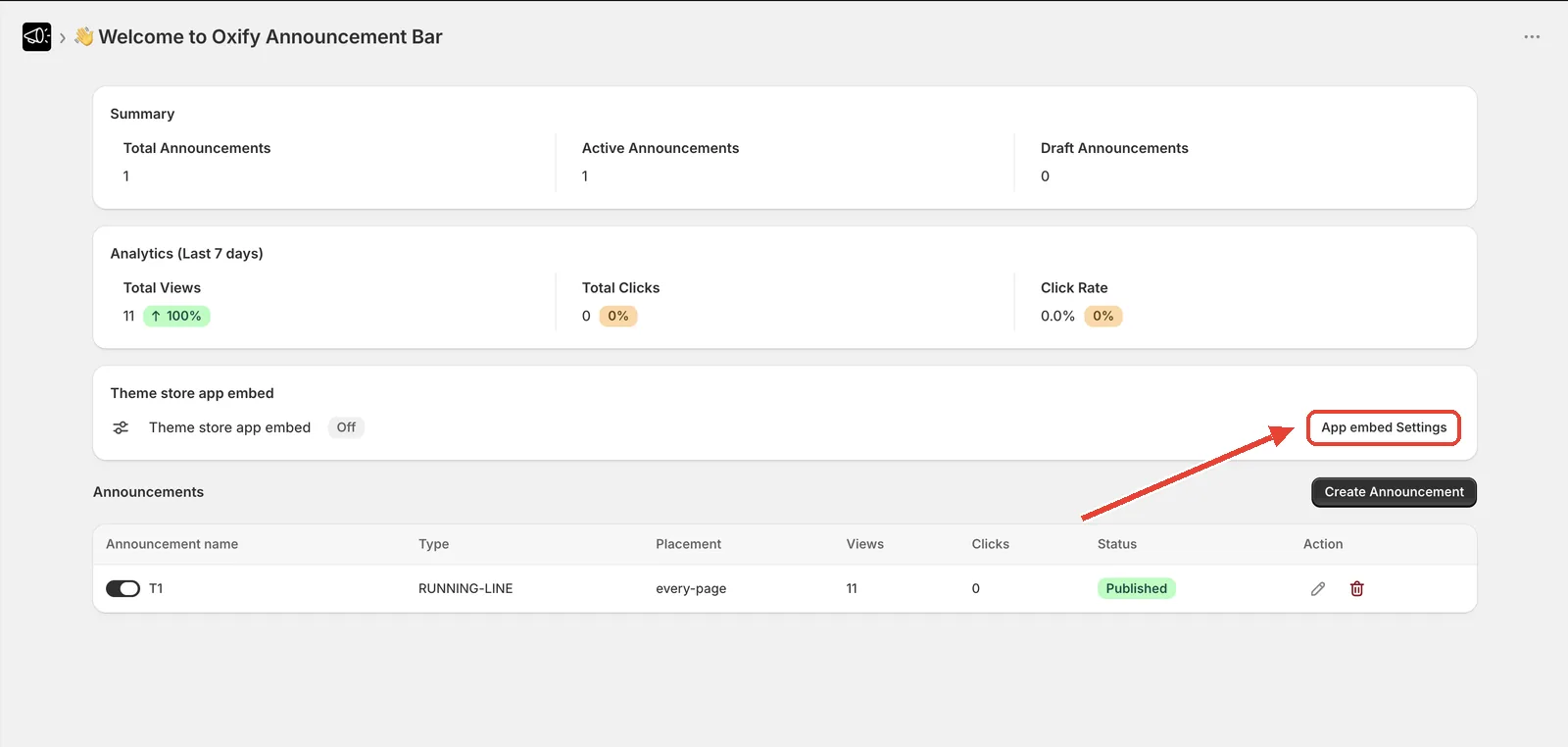
Summary
Three counters for your store:
- Total Announcements — every announcement you've created
- Active Announcements — published and currently live
- Draft Announcements — created but not published
Analytics (Last 7 days)
A separate card directly below Summary:
| Metric | What it counts |
|---|---|
| Total Views | How many times your bars were displayed |
| Total Clicks | How many times visitors clicked a bar or its button |
| Click Rate | Clicks divided by views, as a percentage |
Each carries a badge comparing it against the previous 7 days.
See Views, clicks, and click rate.
Theme store app embed
Shows On or Off. If it says Off, your bars will not appear on the storefront no matter what else you configure. Click App embed Settings to fix it.
See Enable the app embed.
Announcements
Your announcement list, with the Create Announcement button above it.
| Column | What it does |
|---|---|
| Announcement name | Your internal name — customers never see it |
| Publish | Toggle to publish or unpublish the bar instantly |
| Type | Simple, running line, or rotating |
| Placement | Where the bar is set to appear |
| Views / Clicks | Performance for that bar |
| Action | Edit or Delete |
If you haven't built anything yet, you see a No Announcements empty state prompting you to create your first one.
Leave a review
A prompt asking whether you're enjoying the app, with a Leave a review button.
If you click it too early, the app asks you to try again after using it for a day.
Recommended apps
Other Oxify and partner apps you might want. Click Dismiss and the section stays hidden.
Settings
Reachable from the app's navigation. It sets the language of the app admin interface — not your storefront.