
Hide out-of-stock products
Drop sold-out and unavailable products from the builder automatically, instead of showing them greyed out.
By default, a product that's sold out still appears in your builder with an Out of Stock label. Turn this setting on and it's removed from the page entirely.
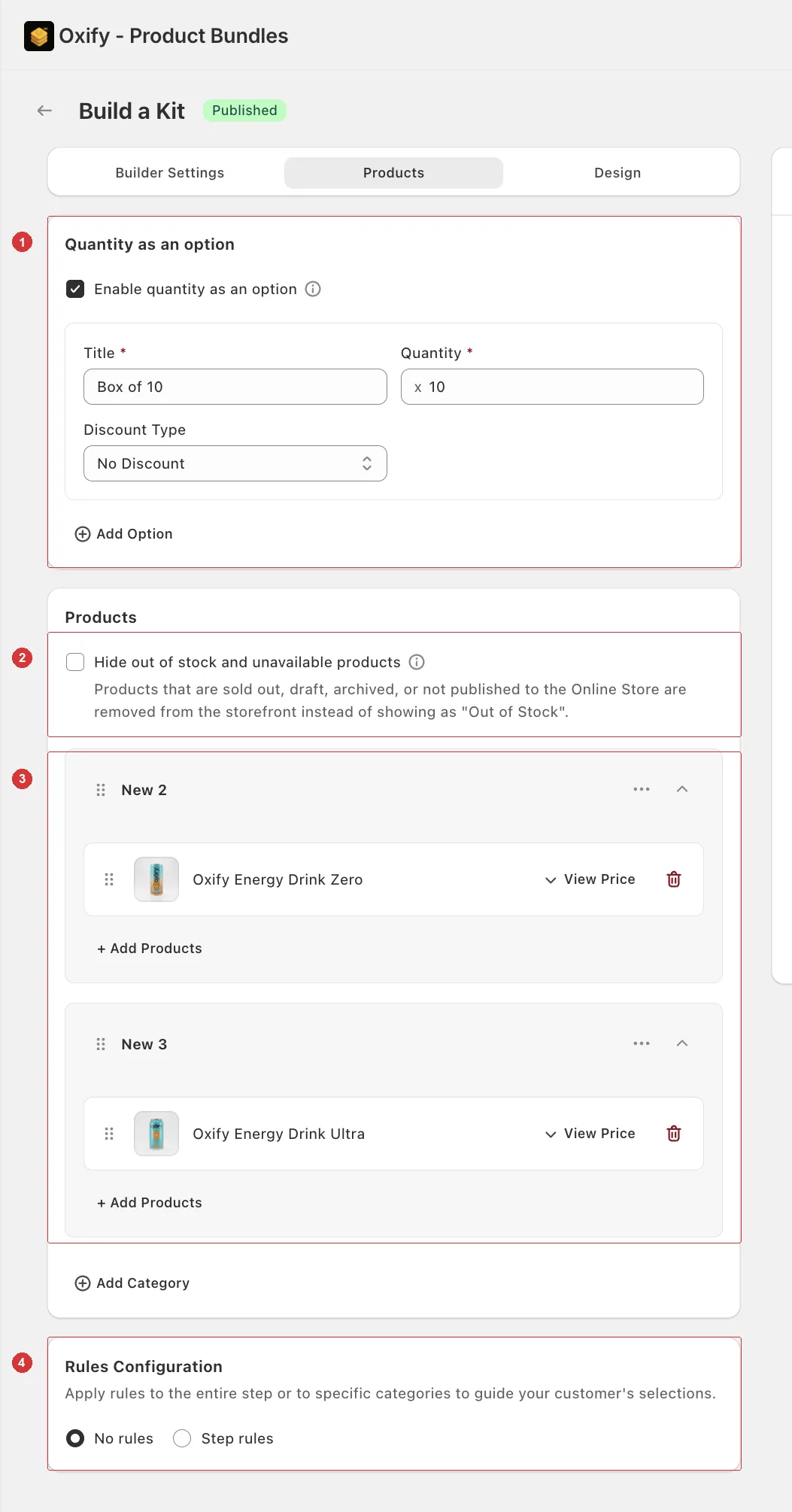
The whole Products tab: 1 box sizes, 2 the out-of-stock setting covered here, 3 your product categories, 4 selection rules.
Turn it on
Open your builder and go to the Products tab.
Tick Hide out of stock and unavailable products. It sits at the top of the Products card, above your categories.
Click Save.
What counts as unavailable
The setting covers more than just zero inventory. A product is removed when it is:
| State | |
|---|---|
| Sold out | Every variant is out of stock and not set to keep selling when out of stock. |
| Draft | Not an active product in Shopify. |
| Archived | Retired from your catalogue. |
| Not published to the Online Store | Missing the Online Store sales channel. Products deleted in Shopify are treated the same way. |
A product that's only partly sold out stays on the page. Customers can still choose its other variants; picking a sold-out one shows your Out of Stock Label and switches the add button off.
It checks itself, every time
This is the part worth knowing: availability is checked live against your storefront each time the bundle builder loads. You don't re-save the builder, and you don't edit anything when stock changes.
A product that sells out at 2pm is gone for the next customer who opens the page. When you restock it, it comes back on its own. If the check can't reach Shopify, products simply stay visible.
If every product in a category is hidden, that category's tab disappears too, so customers never land on an empty one.
Which setting should you use?
| Setting on | Setting off | |
|---|---|---|
| Sold-out product | Removed from the page | Shown with your Out of Stock Label |
| Best for | Big catalogues where a gap goes unnoticed | Small curated sets where a missing product looks broken |
With a handful of products per category, hiding one can leave a category looking half-empty — the greyed-out card at least signals the product exists and is coming back. With twenty products per category, nobody notices the gap and the sold-out card is just friction.
The preview in the app shows everything
The preview next to the settings can't check your live storefront, so it keeps showing every product. Open the live page to see what customers get.
Check your selection rules still work
A category whose products are all hidden drops out of the tab row — and out of any selection rules flow built on it. Keep enough stocked products in each category that customers can still fill the box the way you intend.
The out-of-stock label
When this setting is off, you can customize what unavailable products say — see Out of Stock Label in Product cards.