
Install the app
Add Oxify Quantity Breaks & BYOB to your Shopify store and find the Bundle Builder section.
Install from the Shopify App Store
Open the Oxify Quantity Breaks & BYOB listing in the Shopify App Store.
Click Install and choose the store you want to install on.
Approve the permissions Shopify shows.
If Shopify shows a plan page next, approve the plan to start the 14-day free trial — you aren't charged until it ends. Stores that installed while the app was still free keep free access and skip this step. You can review the plan any time under Plans in the app's sidebar.
You land on the app Home page.
Find Bundle Builder
In the app's left sidebar, click Bundle Builder.
You land on the Bundle Builders list. On a new install it reads No Bundle Builders.
Click Create Bundle Builder to start one.
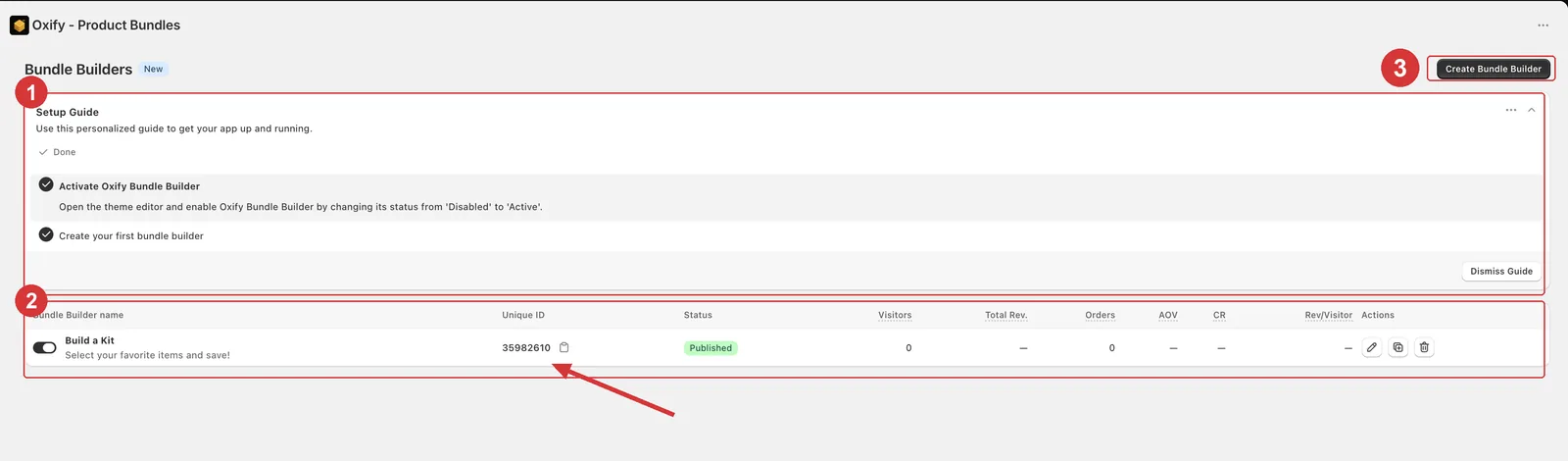
1 the Setup Guide, 2 your builders with their performance figures, 3 the Create Bundle Builder button.
The setup guide
Bundle Builder has its own two-step setup guide on that page, separate from the one on Home:
| Step | What it does |
|---|---|
| Activate Oxify Bundle Builder | The Activate button opens your theme editor so you can switch the app embed on. The step checks itself off once the embed is on — the app re-checks every few seconds, and again whenever you come back to the tab. |
| Create your first bundle builder | The Create Bundle Builder button opens a new builder. The step checks itself off once you have one. |
When both steps are done the guide disappears. To hide it sooner, open its ⋯ menu and click Dismiss — the app remembers that in the browser you're using.
What the list shows
Once you have builders, each row shows:
| Column | What it tells you |
|---|---|
| Name | The builder's Block Name — click it to open the builder. Untitled ones show as Untitled Bundle Builder. |
| Status | A switch labelled Published or Draft. Flip it to publish or unpublish right away. |
| Visitors, Orders, Revenue, Conversion rate | How the builder is performing. See Analytics. |
| Actions | The ⋯ menu: edit, duplicate, copy the Unique ID, delete. |
Manage your builders explains what each action does.
One more step
Installing the app is not enough on its own. You also have to turn on the app embed in your theme, or the builder won't render.