
Analytics
The performance figures shown for each bundle builder, how they're counted, and how to read them.
Every builder in the Bundle Builders list carries its own performance figures, so you can compare builders side by side without opening any of them.
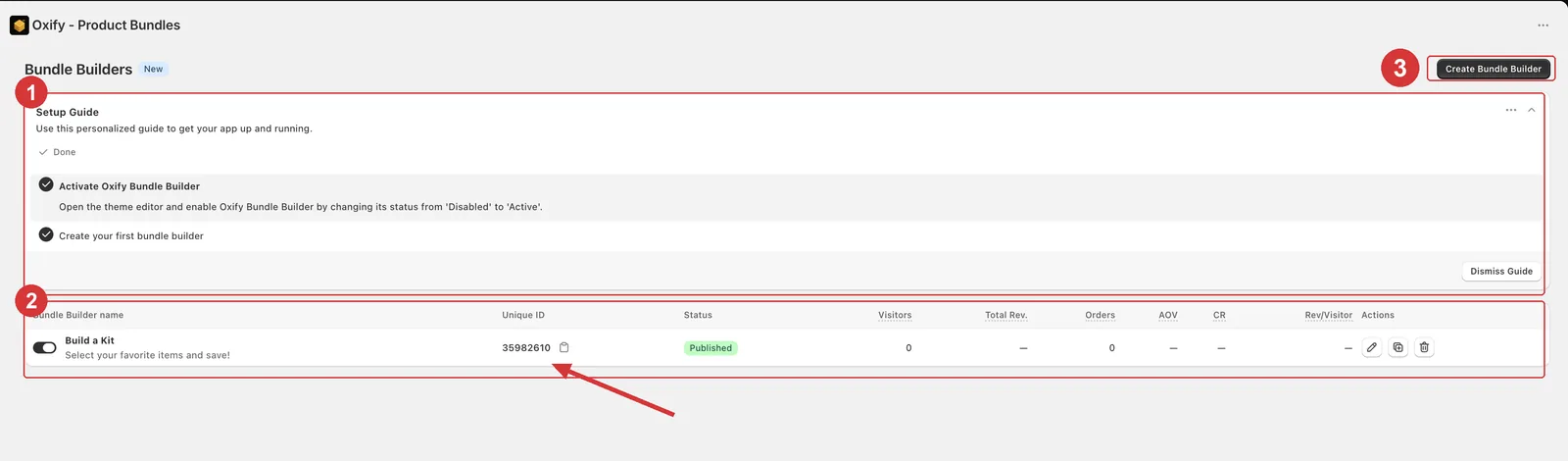
The figure columns sit between Status and Actions on the builders table (2 above). They cover all time — the list has no date filter — and can run up to a minute behind a fresh order.
The columns
| Column | What it counts |
|---|---|
| Visitors | Visits that loaded a page showing this builder. Each visit counts once per builder, and a visit ends after 30 minutes without activity — so someone who comes back later counts again. |
| Orders | Orders that included a bundle from this builder. An order counts once, however many of its bundles it holds. |
| Revenue | Total sales of the products in bundles built with it, in your store currency. |
| Conversion rate | Orders divided by Visitors, as a percentage. |
When the numbers start counting
- Visitors start once the builder is published, placed on a page, and the app embed is on. Each time a shopper loads that page, the app records the visit.
- Orders and Revenue start with the first order placed after that. The app records an order when it's placed; refunds, cancellations and edits made afterwards aren't subtracted.
- A builder in Draft isn't shown on your storefront, so it can't gain visitors. Its figures stay as they were until you publish it again.
A dash instead of a number
A dash (—) means the app can't state that figure honestly. Hover over it to see why:
| Message | When you see it |
|---|---|
| No orders from this bundle builder yet | The builder hasn't sold anything, so Revenue and Conversion rate show a dash. Expected on something you just published. |
| Not enough visitor data to calculate this reliably | Only on Conversion rate, when the builder has more orders than recorded visitors. |
The second one guards against an impossible result. A builder can't sell to more people than visited it, so more orders than visitors means some visits were never recorded — for example, the builder was already selling before the app embed was on. A conversion rate built on that would be misleading, so you get a dash until the visitor count catches up.
It isn't a small-sample warning: one order from three visitors still shows 33.3%, so read early numbers with care.
Which number to act on
- Conversion rate tells you whether the people who see the builder go on to buy. If it's low, look at the builder itself — box sizes, discounts, products, layout.
- Orders and Revenue tell you how much it sells. Compare builders against each other, or one builder against itself over time.
- AOV (average order value, on the Analytics page below) tells you whether your box sizes and discounts are pitched right.
See a builder over time
For date ranges and trends, open Analytics in the app's sidebar.
Click the first filter, which reads All bundle deals, and choose your builder. Builders are listed by their Bundle Name with (Builder) after it, and only published ones are listed.
Click the date filter, which starts on Last 30d, and pick Today, Yesterday, Last 7d, Last 30d, Last 90d, Last 365d, Last month, Last 12 months or Last year.
With a builder chosen you get these tiles, each compared with the previous period of the same length. Click a tile to chart it over time.
| Tile | What it counts |
|---|---|
| Unique visitors | Visits to the builder in the period, counted as above. |
| Additional revenue | Everything sold through the builder's bundles in the period. |
| Bundle orders | Orders that included one of its bundles. |
| AOV | Additional revenue divided by Bundle orders. |
| Conversion rate | Bundle orders divided by visitors. It shows a dash when there are more orders than recorded visitors. |
Choose your builder first
With All bundle deals selected, the Additional revenue total is built around Quantity Break deals and barely counts what builders sell. Pick your builder in the filter to see its sales.
Give it time
Rates need volume before they mean anything: with only a few orders, a single sale moves the rate a lot. Treat early numbers as directional.
Draft builders don't collect data
Only a published builder that's placed on your storefront gains visitors and orders. While a builder sits in Draft its figures stand still, and the time it spent unpublished is simply absent from its history.