
App settings
The app's own Settings page: app language, whether other discounts can combine with your bundle discounts, Shopify Plus stacking and the AI assistant connection.
The app's own Settings page holds options that apply to your whole store, not to one bundle. Open it from Settings in the app menu — not the Bundle Settings tab of a bundle, and not Shopify's own Settings.
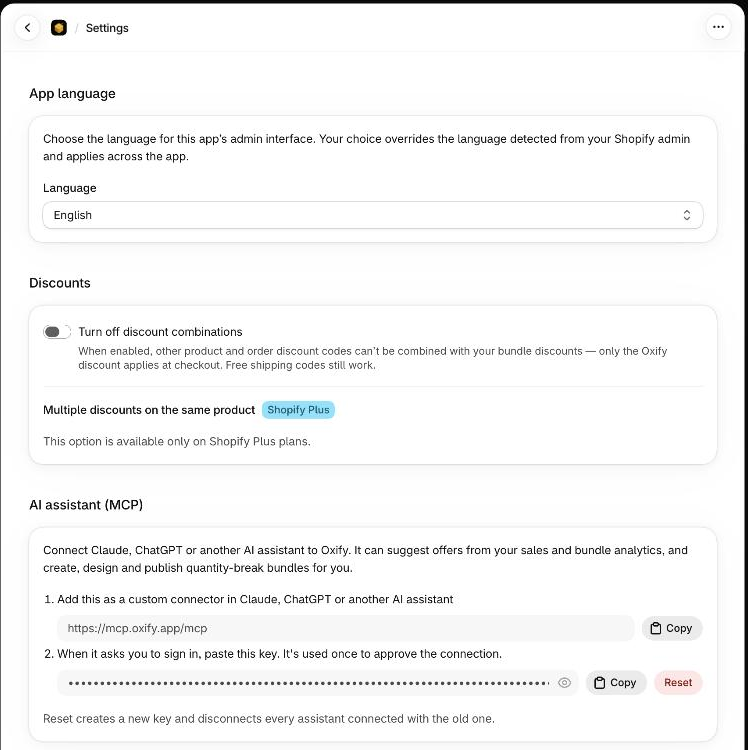
The page has three sections, top to bottom:
| Section | What it does | More |
|---|---|---|
| App language | Sets the language of the app's screens in your Shopify admin. | App language |
| Discounts | Controls whether other discounts can combine with your bundle discounts. | Below |
| AI assistant (MCP) | Connects Claude, ChatGPT or another assistant to your bundles. | AI assistant |
Save your changes
App language and Discounts share one save bar. As soon as you change something, an Unsaved changes bar appears at the top of the app with Discard and Save.
- Save writes everything on the page at once. A green Settings saved. banner confirms it.
- Discard puts every field back to what is saved.
The AI assistant (MCP) section is not part of that save. Copy changes nothing, and Reset takes effect straight away.
Discounts
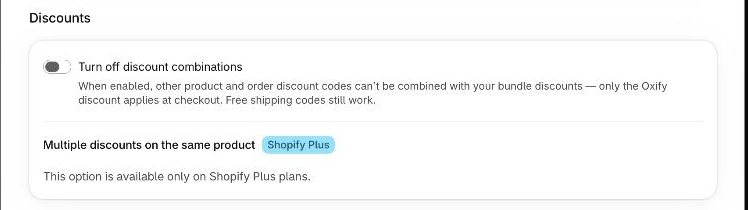
Turn off discount combinations
A switch, off by default. Its help text reads: when enabled, other product and order discount codes can't be combined with your bundle discounts — only the Oxify discount applies at checkout. Free shipping codes still work.
Open Settings in the app menu.
In Discounts, switch Turn off discount combinations on or off.
Click Save in the save bar.
The setting is saved for your store, and the app updates your existing bundle discount in Shopify straight away. If Shopify can't be updated at that moment, a warning banner says Setting saved. It will apply to your discount the next time a bundle is published. The setting is kept either way.
The switch is a shortcut for two store-wide settings, product discounts and order discounts, which a Bundle Builder's advanced settings can set separately. It shows as on only when both are off. Saving this page for another reason — a new language, say — leaves a product-only or order-only choice alone. Only flipping the switch rewrites them.
Turn it on when you never want a bundle to be stacked with another discount code. Leave it off when you run discount codes or other automatic discounts that customers should be able to use together with a bundle. If a bundle discount isn't applying at checkout, see Discount not applying at checkout.
Multiple discounts on the same product (Shopify Plus)
This part of the section carries a Shopify Plus badge.
- On a store that isn't on Shopify Plus, you only see This option is available only on Shopify Plus plans.
- On Shopify Plus, a switch called Allow multiple product discounts on the same product appears. By default Shopify applies only one product discount per product — the best value wins. Turning this on lets your bundle discount stack with other tagged product discounts on the same product. Discounts stack only when their tags match in both directions.
- It can't be used while discount combinations are off. The switch is disabled and the page says Not available while discount combinations are turned off above.
With the switch on, two tag fields appear:
| Field | What to enter |
|---|---|
| This discount's tags | Tags that identify your bundle discount, for example BUNDLE. Other discounts must allow one of these tags to stack with it. |
| Combine with discounts tagged | Tags such as LOYALTY, SEASONAL. Your bundle discount stacks with product discounts that carry one of these tags — as long as those discounts also allow this discount's tags. |
Separate tags with commas. Spaces around a tag are removed and repeats are dropped. Tags are case-sensitive, because Shopify's tags are: Bundle and BUNDLE are different. Each field keeps up to 20 tags of up to 255 characters each.
For example, with This discount's tags set to BUNDLE and Combine with discounts tagged set to LOYALTY, a bundle discount and a loyalty discount tagged LOYALTY can apply to the same product only if the loyalty discount also allows BUNDLE.
App language
The language of the app's screens is set here too. It has its own page: App language.
If it isn't working
| What you see | What to check |
|---|---|
| There is no Save bar | It appears only after you change a field. Change something, or press Discard if you want to go back. |
| Allow multiple product discounts is missing | Your store isn't on Shopify Plus. |
| Allow multiple product discounts is greyed out | Switch Turn off discount combinations off first. |
| The tag fields aren't showing | Switch Allow multiple product discounts on the same product on. |
| A bundle discount still doesn't combine with another code | The other discount has to allow combining too, and on Shopify Plus its tags have to match in both directions. |